SharePoint and Snoobi
Content Security Policy (CSP) is a security feature that helps prevent against various attack vectors for websites.
CSP enables a site to control which resources a page is allowed to load. It works through a series of instructions to the browser from the website, which instruct the browser what the page is allowed to load.
Microsoft is enforcing CSP in Sharepoint in Marvh 2026. That potentially impacts the ability for Snoobi Analytics to collect analytics data if the Snoobi tracking domains are blocked. The Snoobi tracking domains and scripts are at snoobi.eu and snoobi.com.
Managing the Content Security Policy rules in SharePoint Online
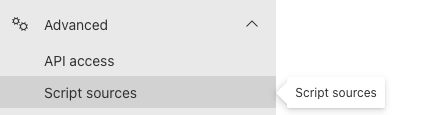
To add an entry, in a browser, go to the Trusted Script Sources: SharePoint Online Admin Center > Advanced > Script sources. (Note: This may be in your local language)
You will see the next screen where you can add the sources.
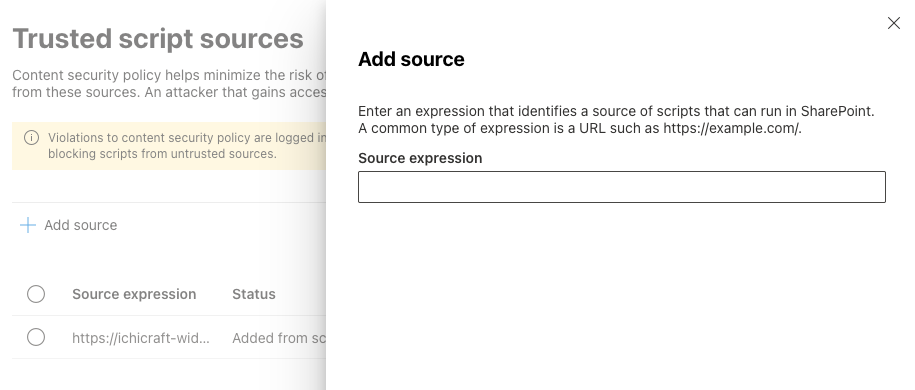
As the domains are snoobi.eu and snoobi.com, you should be able to use the wildcards for *.snoobi.eu and *.snoobi.com. Like this: https://*.snoobi.com/ and https://*.snoobi.eu/
If wildcards are not accepted, then https://eu2.snoobi.com and https://eu2.snoobi.eu should be used instead.
For more detailed information, here is the Microsoft reference: https://learn.microsoft.com/en-us/sharepoint/dev/spfx/content-securty-policy-trusted-script-sources
There you can also find how you can check if your entries are valid by reviewing the text in the documentation about "View CSP violations in the browser’s console"
Was this article helpful?
That’s Great!
Thank you for your feedback
Sorry! We couldn't be helpful
Thank you for your feedback
Feedback sent
We appreciate your effort and will try to fix the article